
Download ResMe xyz – AI‑Powered Resume Builder, Free, Secure & Easy to Use
Overview: Why ResMe xyz is Changing the Resume Game
In today’s hyper‑competitive job market, a well‑crafted resume is more than just a list of past jobs – it’s your personal brand, your first interview, and often the deciding factor between getting a callback or being filtered out by an Applicant Tracking System (ATS). ResMe xyz tackles this challenge head‑on with an AI‑driven web platform that automates the heavy lifting while still giving you full creative control. Built on advanced natural‑language processing, the tool analyses your work history, extracts key achievements, and rewrites bullet points to meet industry‑specific keywords and formatting standards. The result is a polished, ATS‑friendly document that looks professionally designed without the need for a graphic designer.
What truly sets ResMe apart is its emphasis on personalization. Instead of forcing you into a one‑size‑fits‑all template, the platform lets you generate multiple tailored resumes for each job posting, adjusting tone, focus, and keyword density to match the specific role. The real‑time editor lets you preview changes instantly, and a built‑in community on Discord offers peer feedback, template ideas, and troubleshooting tips. Whether you’re a fresh graduate unsure how to showcase internships or a seasoned executive looking to re‑brand, ResMe provides the scaffolding you need to turn raw data into a compelling narrative.
Security and privacy are baked into the service. All documents are stored in encrypted cloud storage, and you retain full ownership of your content. Downloads are available in both PDF and Microsoft Word formats, and you can also share a live link that updates automatically as you edit, making collaboration with career coaches seamless. In short, ResMe xyz is a free‑to‑start, secure, AI‑enhanced resume solution that promises to streamline the creation process, boost ATS success rates, and ultimately increase your chances of landing that coveted interview.
Features & Benefits: What ResMe xyz Offers
- AI‑Generated Bullet Points: Turn vague responsibilities into quantified achievements with just a click.
- Job‑Specific Tailoring: Create multiple versions of a resume, each optimized for a particular posting.
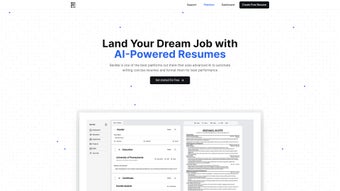
- Real‑Time Editor & Preview: See formatting and content changes instantly across PDF and Word views.
- ATS Optimization: Built‑in keyword analysis ensures your resume passes through automated screening tools.
- Portfolio Website Builder: Turn your resume into a sleek personal website for recruiters to explore.
- Multi‑Format Export: Download in PDF for final submission or Word for further customization.
- Live Share Link: Share a dynamic link that updates as you edit, perfect for mentors and recruiters.
- Secure Cloud Storage: All documents are encrypted and accessible from any device.
- Community Support via Discord: Get feedback, template ideas, and troubleshooting from fellow job seekers.
- Free Tier with Premium Upgrades: Access core AI features at no cost, with optional paid plans for advanced analytics.
Pros
- AI assistance dramatically reduces the time spent on writing and formatting.
- Tailored resumes increase relevance for each job application.
- ATS‑friendly output improves chances of passing initial screening.
- User‑friendly interface requires no design or technical expertise.
- Free tier offers substantial value for students and entry‑level professionals.
Cons
- Advanced analytics and premium templates are locked behind a subscription.
- Internet connection required; offline editing is not supported.
- While AI suggestions are strong, they sometimes need human tweaking for niche industries.
Overall, the feature set of ResMe xyz balances automation with customization, making it a versatile tool for a broad audience. The AI‑enhanced points feature is especially valuable for those who struggle to articulate achievements, while the job‑specific tailoring ensures each application feels bespoke rather than generic. Even the cons are relatively minor compared with the time saved and the professional polish the platform delivers.
Installation, Usage & Compatibility: Getting Started in Minutes
Because ResMe xyz is a web‑based application, there’s no traditional “installation” process. All you need is a modern browser and an internet connection. Here’s a step‑by‑step guide to launch the platform and start building your first resume:
Step 1 – Create Your Account
Visit ResMe.xyz and click “Sign Up.” You can register using an email address or through single‑sign‑on options like Google or LinkedIn. The free tier grants immediate access to the AI editor and basic templates.
Step 2 – Input Your Work History
Navigate to the “My Profile” section and fill in your education, employment dates, and key responsibilities. The platform stores this data securely, allowing you to reuse it across multiple resume versions without re‑typing.
Step 3 – Generate AI‑Enhanced Bullet Points
Select a job entry and click “Generate Points.” The AI analyzes the role description and suggests quantified achievements (e.g., “Increased sales by 20% within six months”). You can edit, accept, or discard each suggestion, ensuring the final wording reflects your voice.
Step 4 – Tailor for a Specific Job
Upload a job posting or paste the description into the “Job Match” field. ResMe scans for keywords, adjusts the bullet points, and recommends a layout that highlights the most relevant experience. You can create unlimited versions, each saved as a separate project.
Step 5 – Export or Share
When you’re satisfied, click “Export.” Choose between PDF (ideal for submission) or Word (for further tweaks). Alternatively, enable the “Live Link” option to generate a shareable URL that updates in real time—perfect for mentors or recruiters who want to view the latest version without requesting a new file.
Compatibility
ResMe xyz works on all major operating systems that support a modern web browser, including Windows 10/11, macOS Monterey and later, Linux distributions, Android 8.0+, and iOS 13+. The responsive design ensures a seamless experience on desktop, tablet, and smartphone screens. Because the application runs entirely in the cloud, you’ll always have access to the latest features and AI models without manual updates.
For users who prefer a more traditional desktop environment, ResMe also offers a progressive web app (PWA) installation option. By clicking the “Install App” button in the browser toolbar, you can add a shortcut to your desktop or home screen that launches the platform in a standalone window, mimicking a native app experience while still receiving automatic updates.
Frequently Asked Questions
Is ResMe xyz really free to use?
Yes, ResMe offers a robust free tier that includes AI‑generated bullet points, unlimited resume versions, PDF/Word export, and basic ATS optimization. Premium features such as advanced analytics, premium templates, and priority support are available through a subscription.
How does ResMe ensure my data is secure?
All user data is encrypted both in transit (HTTPS) and at rest (AES‑256). ResMe does not sell or share personal information with third parties. You retain full ownership of your resumes, and you can delete your account and all associated files at any time.
Can I use ResMe on a mobile device?
Absolutely. The responsive web interface works on Android and iOS browsers. Additionally, you can install the PWA version for an app‑like experience on your phone or tablet.
Will the AI-generated content pass ATS scans?
ResMe’s AI is trained on millions of job postings and includes a keyword‑matching engine that aligns your resume with the most common ATS criteria. While no tool can guarantee 100% pass rates, users report a significant increase in interview callbacks after switching to ResMe‑optimized resumes.
Do I need any design skills to create a professional-looking resume?
No design experience is required. ResMe provides a library of modern, ATS‑friendly templates that automatically adjust spacing, fonts, and headings. You can further customize colors and layouts via the drag‑and‑drop editor if desired.
Conclusion & Call to Action
ResMe xyz delivers a compelling blend of AI automation, personalization, and ATS awareness that many traditional resume builders simply cannot match. By handling the time‑consuming aspects of content generation and formatting, it frees you to focus on what truly matters: tailoring your story to each opportunity and preparing for the interview itself. Whether you’re a recent graduate, a mid‑career professional, or an executive looking to re‑brand, the platform’s flexible workspace, secure cloud storage, and community support make it a worthy addition to your job‑search toolkit.
Ready to give your career a boost? Download ResMe xyz now, create a free account, and start building a resume that not only looks great but also speaks the language of recruiters and ATS algorithms alike. For those who want to unlock premium analytics and exclusive templates, a low‑cost subscription is just a click away. Take control of your professional narrative today and watch the interview invitations roll in.



.png)



